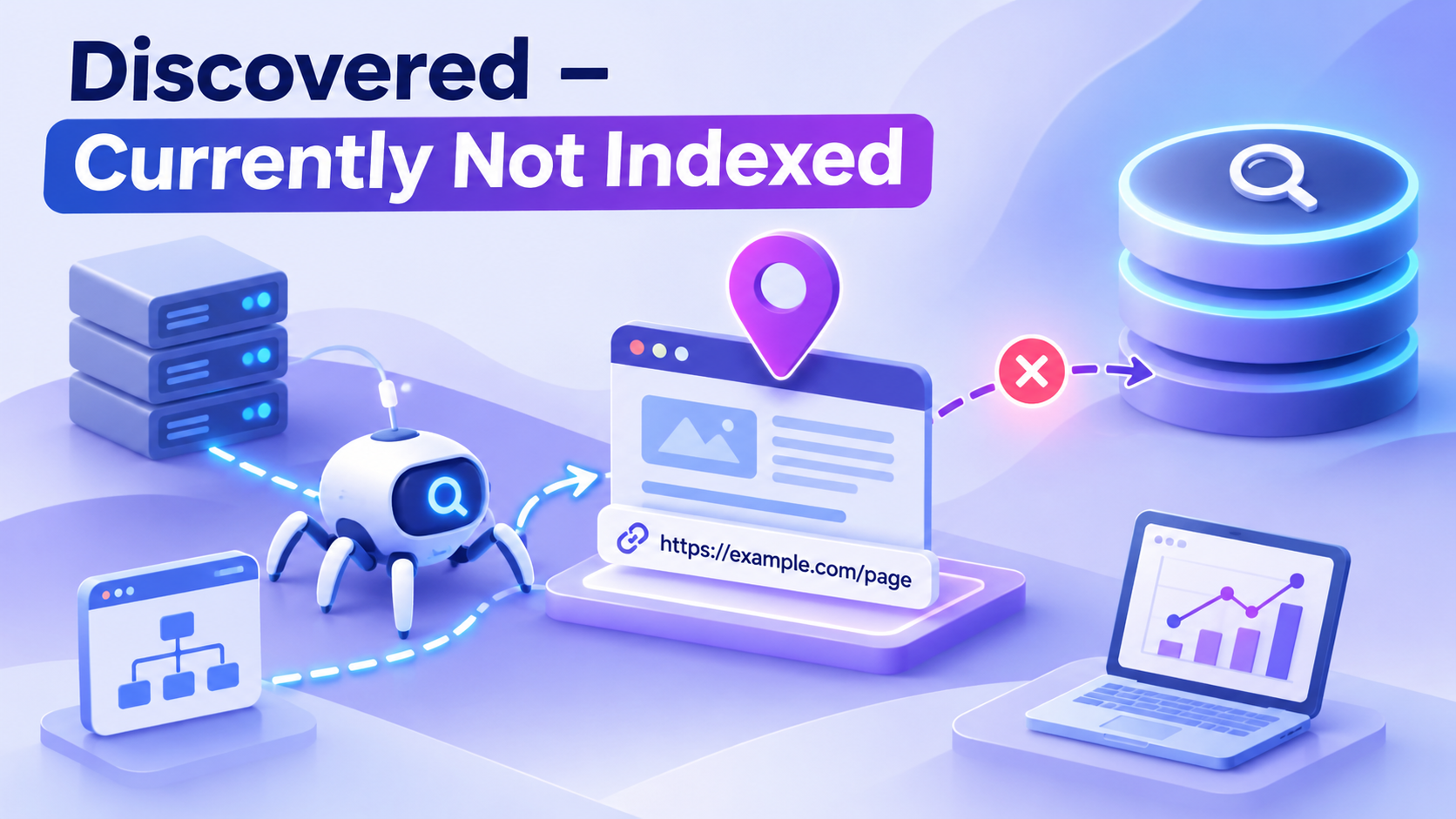
A URL appears in your sitemap. Google Search Console knows it exists. But weeks later, the URL is still labeled “Discovered – currently not indexed.” Why hasn't Google crawled a page it already knows about?
The answer begins with an important distinction: discovery is not crawling. Google's Page indexing report says this status means Google has found the URL but hasn't crawled it yet. Its documentation explains that Google may have postponed a crawl because accessing the site was expected to overload it. This status typically has no last crawl date in the report.
That explanation is a starting point, not a complete diagnosis for every site. Crawl scheduling also involves demand, perceived usefulness, site structure, and the resources required to fetch a URL. You need to determine whether you have a server capacity problem, a URL-prioritization problem, or an oversized inventory of low-value pages.
This guide shows how to investigate those possibilities without confusing submission, crawling, and indexing.
What does “Discovered – currently not indexed” mean?#
Google knows the URL exists—perhaps from an XML sitemap, an internal link, or another website—but Search Console has not recorded a crawl of that URL. Until Google successfully fetches and processes it, you cannot assume that it has evaluated the current page's full content.
Here is the practical sequence:
- Discovered: Google becomes aware of the URL.
- Scheduled or prioritized: Google's crawling systems decide when to request it, subject to demand and capacity.
- Crawled: Google fetches the URL and may render relevant resources.
- Evaluated for indexing: Google processes the content and canonical signals, potentially adding a page to its index.
- Eligible to appear in results: Indexed pages can be selected for relevant searches, but indexing doesn't guarantee a particular ranking or appearance.
The second and third stages are where a discovered-but-not-crawled URL is waiting. Google can decide to crawl it later, but there is no guaranteed deadline.
How this differs from “Crawled – currently not indexed”#
| Question | Discovered – currently not indexed | Crawled – currently not indexed |
|---|---|---|
| Is Google aware of the URL? | Yes | Yes |
| Has Google crawled it, per the report? | Not yet | Yes |
| Is a last crawl date typically shown? | No | Often, yes |
| First priority | Server health, URL discovery context, crawl scheduling | Content, duplication, rendering, canonicalization |
| Does the status guarantee eventual indexing? | No | No |
For the post-crawl scenario, see Crawled – Currently Not Indexed: What It Means and How to Fix It.
Step 1: Measure the scope before trying fixes#
Open Google Search Console and navigate to Indexing → Pages → Discovered – currently not indexed. Look at the number and types of affected URLs. Sample across groups rather than inspecting only the homepage.
Create an inventory with these columns:
| Field | Why it matters |
|---|---|
| URL | Identifies exact affected page |
| Page type / template | Helps detect problems affecting a whole directory |
| Discovery source | Sitemap, internal link, external link, or unknown |
| HTTP status (currently) | Checks accessibility, but not historical Googlebot access |
| Internal linking depth | Helps identify isolated pages |
| Last meaningful update | Separates newly published content from stagnant queues |
| Business importance | Prioritizes pages worth fixing |
Now classify the scope:
- A few recently added URLs: Often best monitored while you validate technical basics.
- A large share of new articles: Look at publication workflow, internal links, quality differentiation, and crawl history.
- Thousands of product or filter URLs: Investigate URL explosion, canonical architecture, and demand on the server.
- A sudden spike across the entire site: Investigate hosting, security layers, redirects, and recent deployments first.
Do not interpret the raw number of non-indexed URLs as a disaster. Many sites generate URLs that should never be indexed in the first place.
Step 2: Investigate crawl capacity and server availability#
Google tries to avoid overwhelming a website. Its crawl infrastructure takes serving capacity into account. If your host frequently responds slowly, returns 5xx errors, or imposes aggressive rate limits, Google's systems can reduce or postpone requests.
Check Settings → Crawl stats in Search Console where available. Inspect host status, response types, average response time, and recent trends. Look for spikes in server errors or slow responses that coincide with the affected publication period.
Then examine server logs for genuine Googlebot requests. For example, a simplified log might show:
203.0.113.10 - - [10/Nov/2026:08:00:00 +0000] "GET /guide-a/ HTTP/1.1" 200 28310
203.0.113.10 - - [10/Nov/2026:08:00:01 +0000] "GET /guide-b/ HTTP/1.1" 503 1200
These are fictional illustration records; the IP is from a documentation-only range and is not Googlebot. A real investigation should verify Googlebot identity instead of trusting the user-agent string or any unfamiliar address.
What to fix: Reduce excessive response latency, stabilize origin servers, repair application failures, review firewall and CDN challenges, and avoid incorrectly throttling verified search-engine crawlers. Don't buy more server capacity without evidence of a real bottleneck. Google distinguishes crawl capacity from crawl demand; a faster server alone doesn't force crawls when demand is low.
Step 3: Decide whether Google has a reason to prioritize the URLs#
A site may serve pages quickly yet still have a backlog of discovered URLs. Google cannot crawl every known URL immediately, and its systems allocate resources based partly on how worthwhile and necessary crawling appears to be.
Look for signals that the affected group is lower priority:
- The URLs are never linked from important site pages.
- Thousands of pages are created from the same thin template.
- The content duplicates more established pages.
- A section hasn't been updated or maintained meaningfully.
- The website produces large numbers of parameter combinations with little unique value.
These are diagnostic clues, not a published mathematical formula for Google's crawl scheduler. Google does not provide a universal authority threshold, minimum backlink count, or a fixed crawl quota that every website can unlock.
What to fix: Make important pages accessible through relevant hubs and navigation. Publish material that warrants individual pages. Consolidate redundant templates or parameter permutations. Preserve useful differentiation rather than generating many nearly identical landing pages.
Step 4: Audit internal linking and orphan pages#
A URL discovered through a sitemap might still have no ordinary internal links pointing to it. Sitemaps help Google find URLs, but a coherent link structure tells crawlers—and visitors—how pages fit together.
Suppose your website includes a guide at /resources/google-indexing/, but the only reference appears in sitemap.xml. Add it to an appropriate resource hub and connect it from related articles:
<p>
  New to the topic? Read our
  <a href="/resources/google-indexing/">guide to Google indexing</a>
  before troubleshooting Search Console warnings.
</p>
Verify that links use real href destinations and can be seen by Google in rendered HTML. Avoid internal links buried behind inaccessible clicks or an internal search feature. Prioritize the most relevant pages rather than indiscriminately linking every URL from every page.
A practical orphan-page audit#
- Export the canonical URLs you want indexed from your CMS or sitemap.
- Crawl the website using an internal-link crawler or your own script.
- Compare the crawlable URL set with the canonical inventory.
- Identify important pages with zero internal inlinks or with links only from obscure archives.
- Add useful links from the most logical parent and related pages.
- Recheck whether URLs are now reachable from the site's navigational structure.
A page having an internal link does not guarantee that Google will crawl it; it simply removes an important avoidable barrier.
Step 5: Clean the XML sitemap#
A sitemap should be a reliable inventory of preferred, indexable URLs—not a dump of everything your website has ever generated.
Check that it avoids:
- URLs returning redirects,
404,403, or5xxresponses. - Pages intentionally marked
noindex. - Noncanonical duplicates and tracking parameters.
- Staging or testing domains.
- Outdated pages that no longer serve users.
- Fake
<lastmod>timestamps rewritten automatically without content changes.
Example of a minimal entry:
<url>
  <loc>https://example.com/resources/google-indexing/</loc>
  <lastmod>2026-11-09</lastmod>
</url>
Submit or verify your sitemap in Search Console and review its processing status. Google treats it as a hint, not a demand. Re-submitting an unchanged file several times a day is not a reliable way to secure more crawling.
Step 6: Reduce unnecessary URL inventory on large sites#
A catalog with 5,000 products might accidentally generate 100,000 sortable, filtered, or paginated variants. Crawlers can encounter URLs like:
/shoes?color=blue&size=9&sort=price
/shoes?sort=price&size=9&color=blue
/shoes?color=blue&size=9&sort=popular
If these combinations do not provide unique search value, they can create needless crawling work and muddle canonical signals. Audit which filtered categories deserve stable landing pages. Consolidate redundant URL versions, use consistent canonical URLs, and apply suitable crawling controls for unnecessary combinations.
Be careful: robots.txt blocking a page can prevent Google from seeing its canonical or noindex tag. Plan your duplicate-control approach deliberately rather than stacking conflicting directives.
Google's crawl budget documentation is mainly aimed at very large, rapidly changing, or heavily discovery-limited sites. Most small websites should first focus on clean sitemaps, sensible navigation, and reliable pages.
Step 7: Audit whether security and infrastructure block Googlebot#
A CDN, web application firewall, anti-bot tool, or login middleware can protect your website but also inadvertently challenge legitimate crawlers. Browser access alone does not rule this out.
Review access logs, WAF events, and bot-management rules. Confirm the relevant URLs are publicly available without a session or CAPTCHA. Verify real Googlebot using Google's documented verification methods, including reverse and forward DNS checks where appropriate. Make narrow corrections, not blanket security bypasses.
If the issue started immediately after migrating domains or deploying a new site, also check hostnames, DNS resolution, TLS configuration, and accidental redirects to old or staging domains.
Step 8: Treat new and old URLs differently#
A page published yesterday and a business-critical page stuck in the same status for months require different responses.
For new pages, confirm basic crawlability, sitemap coverage, and internal links; then monitor. Google says discovery and crawling can take time and doesn't provide a guaranteed schedule.
For persistent, high-priority pages, inspect the entire section, not just the individual URL. Compare related indexed and non-indexed URLs. Look for shared template weaknesses, server errors, an excessive inventory of duplicates, or internal links that don't make the section valuable and discoverable.
For intentional low-value pages, it may be perfectly appropriate not to pursue indexing at all.
Step 9: Request recrawling only where it makes sense#
Search Console's URL Inspection feature can request a crawl for a small number of URLs you own or manage. For large collections, a sitemap and internal links are more practical. Requests are quota-limited and Google's indexing decisions remain independent.
Before requesting anything, check whether a fix was made. If you repaired a server outage, linked newly published priority pages, or corrected a sitemap, submitting or refreshing the relevant discovery signals may be reasonable. Repeatedly requesting an unchanged URL every day is unlikely to help.
Important: Google's official Indexing API is not a general-purpose API for submitting arbitrary website pages. It has restricted eligible content types. Don't confuse a third-party URL processing service with unrestricted access to Google's Indexing API.
Three worked examples#
Example A: A new business blog with six posts#
Observation: The homepage is indexed; three new posts are discovered but uncrawled. The sitemap is valid and the server is healthy.
Action: Add the posts to a visible blog listing, create relevant contextual links, inspect one representative URL, and monitor rather than making repeated identical requests.
Reasoning: Nothing yet points to a sitewide technical failure. The pages may simply be early in Google's crawl process.
Example B: An e-commerce website with 40,000 filtered URLs#
Observation: Most of the discovered backlog consists of query-parameter URLs showing nearly identical results.
Action: Identify which filtered views genuinely satisfy distinct search intent. Consolidate or manage duplicates, strengthen canonical signals, and keep only preferred URLs in the sitemap.
Reasoning: Reducing needless URL inventory can make crawling more efficient; simply requesting all 40,000 URLs isn't a meaningful remedy.
Example C: A publisher behind a strict bot firewall#
Observation: An abrupt rise in the discovered backlog coincides with WAF changes and increased errors in crawl statistics.
Action: Inspect firewall logs, verify actual Googlebot requests, fix mistaken challenges and rate limits, and monitor whether successful crawling resumes.
Reasoning: A systemic access problem is a plausible explanation for postponed crawling.
All examples are fictional scenarios for teaching diagnosis, not reported CrawlMe case studies.
How to measure whether your changes worked#
Monitor the affected page type over several crawl cycles and compare:
- Number of important URLs in the discovered-but-not-crawled bucket.
- Movement into Crawled – currently not indexed or Indexed.
- Crawl request volume, host status, and server errors.
- New versus old URL counts in each status.
- Whether Googlebot has actually fetched representative URLs, when server logs are available.
A decline in one bucket isn't necessarily a win if the pages moved into another exclusion category. The meaningful outcome is that valuable canonical pages are being crawled, understood, and indexed where Google chooses, while unnecessary URLs stop consuming attention.
Where CrawlMe fits#
If you manage many publicly accessible URLs across campaigns, CrawlMe can help centralize batch URL processing as part of your operational workflow. Its credit-based service is designed for SEO professionals and publishers who need to handle URL submissions without managing each address individually.
However, CrawlMe cannot compel Google to allocate more crawl capacity or demand, fix a broken server, or override Google's indexing decisions. Before submitting a batch, verify that its URLs are useful, publicly accessible, and technically prepared. Track Google Search Console and site logs separately from submission-platform processing status.
Frequently asked questions#
Does “Discovered – currently not indexed” mean Google rejected my content?#
No. The report indicates Google has not yet crawled the URL. It does not by itself establish Google's assessment of the page's full contents.
Is this always a crawl-budget problem?#
No. Capacity is explicitly part of Google's explanation, but crawl demand, site architecture, URL inventory, and timing also matter. Large-site crawl-budget work may be useful, but it should not be the first response for every small site.
Can I fix it by buying backlinks?#
There is no guaranteed link quantity that forces Google to crawl or index a page. Legitimate editorial links may help discovery; buying links for ranking manipulation creates separate spam risks. Fix your own navigation and crawl health first.
Should I submit every affected URL every day?#
No. Google's recrawl requests are quota-limited; repeated submissions don't guarantee faster crawling. Maintain accurate sitemaps and focus on meaningful site changes.
What if the status changes to “Crawled – currently not indexed”?#
That indicates Google has progressed to fetching the URL but hasn't indexed it. Next inspect the rendered page, usefulness, duplication, and canonical selection instead of continuing to focus exclusively on crawl scheduling.
Final checklist#
- ☐ Identify which high-priority canonical URLs are affected.
- ☐ Separate recent discoveries from persistent backlogs.
- ☐ Review Crawl Stats and hosting logs for capacity or access issues.
- ☐ Verify that WAF/CDN rules don't accidentally block real Googlebot.
- ☐ Link important pages from useful site hubs and related content.
- ☐ Remove noncanonical or unhelpful URLs from sitemaps.
- ☐ Reduce needless faceted, parameter, and duplicate URL inventory.
- ☐ Avoid assuming a fast server guarantees higher crawl demand.
- ☐ Track transitions between Search Console statuses over time.
- ☐ Remember: crawl and indexing requests are not guarantees.
Bottom line: A discovered URL is only the beginning. Make your valuable pages easy to find, efficient to fetch, and worth revisiting; remove unnecessary URL clutter; diagnose actual hosting problems; and evaluate progress using Search Console instead of repeated submission attempts.